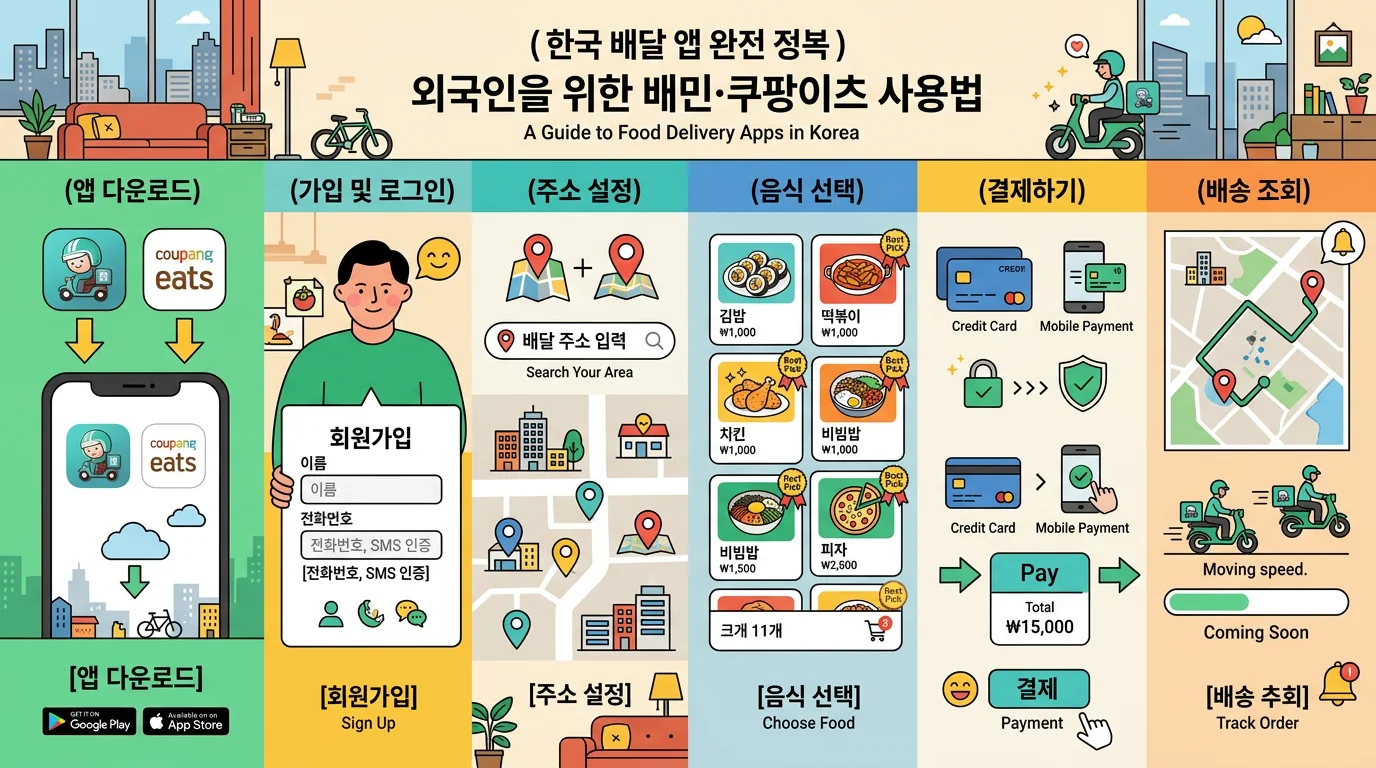
🍗 Mastering Korea's Delivery Apps — A Foreigner's Guide to Baemin & Coupang Eats
⚠️ Please note
The subscription fees, delivery fees, overseas-card support, and language coverage in this guide change often with app updates and store policies (overseas-card payment in particular can work one day and not the next, depending on the app, card issuer, and timing). Check each app's latest screens and payment options before ordering. In-app languages apply only to the customer screen — the delivery rider and the store still communicate in Korean. This guide doesn't endorse any particular app, and whether something actually works depends on your situation (visa/stay type, phone number, card).
⏱️ 30-Second Summary — Just Remember This!
🍗 Concept → Food to your door via app, even late at night
📱 Apps → Baemin (best language + global payment), Coupang Eats (fast), Yogiyo (free-delivery subscription)
🌍 Language → Baemin officially supports EN/CN/JP; Coupang Eats depends on device/account 💳 Payment → Baemin covers the most: overseas cards, Apple Pay, WeChat Pay, Alipay+
🔑 Verification → Sign-up hinges on Korean phone verification; travelers can try guest/overseas-number options
🏠 Address → Road-name address + building/unit + entrance passcode, in detail
💰 Etiquette → No tipping; minimum order and delivery fee are separate
1. 🍜 What Makes Korean Delivery So Special?
Let's set expectations first.
Almost everything delivers: Not just chicken, pizza, and Chinese food, but Korean meals, snacks, café desserts — even convenience-store items come by app.
Single portions are fine: "One-person delivery" is common, so eating alone is no problem.
Real-time tracking: You can watch cooking → out for delivery → arrival on a map.
Contactless by default: These days, leaving the food at your door ("contactless delivery") is standard. You don't have to meet anyone face to face.
2. 📱 Comparing the 3 Apps — Which Fits a Foreigner?
All three are on iOS and Android. From a foreigner's perspective, here's the rundown (fees/policies are for reference and can change).
Baemin (배달의민족) — most recommended for foreigners
The largest number of partner stores (covers smaller cities too). As of 2026 it officially supports English, Chinese, and Japanese.
The widest range of global payment: overseas-issued cards, Apple Pay (overseas cards), WeChat Pay, Alipay+, and more.
The "Baemin Club" subscription (around ₩4,000/month) discounts delivery fees.
Coupang Eats — fast delivery
Because one rider handles one order at a time, its strengths are speed and real-time tracking. Food tends to arrive warm.
However, foreigner verification, overseas cards, and language support can vary by account, device, and payment method (sometimes it works, sometimes it doesn't). Check your payment options in advance.
Good if you use a Coupang membership (Rocket Wow).
Yogiyo — better for residents
A familiar app for domestic users, with the "Yogipass X" subscription offering unlimited free delivery.
That said, its English support and overseas-card payment aren't reliably foreigner-ready, so it suits residents who already have a Korean phone number and domestic payment methods (Korean card / local pay).
👉 If you're a traveler with only a foreign card, Baemin is the safest first choice.
3. 🔑 The Biggest Wall — Sign-up & Identity Verification
Most Korean apps require phone-number identity verification. Split your situation into two cases.
Short-term traveler (no Korean phone)
Verification goes most smoothly if you have a Korean SIM/eSIM number (e.g., picked up at the airport).
Baemin increasingly works via guest orders or overseas-number SMS verification (when your foreign number can receive texts in Korea via Wi-Fi calling). But it may or may not work depending on the app and timing, so treat it as a nice-to-have.
Foreigner living in Korea
With an Alien Registration Card + a phone under your name from a Korean carrier (SKT/KT/LG U+), you can register a full account.
Your carrier account name must match your app name exactly — even a single space in your romanized name can matter for verification.
4. 💳 Payment — From Overseas Cards to Korean Cards
Payment is the second most common sticking point for foreigners.
Overseas credit cards: VISA, Mastercard, and the like are most reliable on Baemin. An overseas card added to Apple Pay also works on Baemin. Coupang Eats sometimes accepts overseas cards but it can vary by account/device, and Yogiyo is built mainly around domestic payment, so a foreign-only card may not work.
Simple pay: Baemin also supports global simple-pay like WeChat Pay and Alipay+ — handy for travelers from China and Southeast Asia.
If you're staying in Korea: Registering a Korean bank account + Korean card (or KakaoPay, etc.) is the smoothest. Highly recommended for longer stays — and in that case Yogiyo works fine too.
Cash (pay on delivery): Door-side cash payment used to be possible, but many stores are phasing it out. Set up a card or simple-pay as your default.
5. 🏠 Entering Your Address & Delivery Requests — Where Mistakes Happen
Korean addresses can be confusing at first. Just cover these.
Use the road-name address: Search by building name or road-name address in the app to pin your location. Set the map pin precisely.
Detailed address is essential: Even with the right building, you won't get your food without the building/floor/unit. e.g., "○○ Apartment, Bldg 101, Unit 1203."
Entrance passcode: For officetels and apartments, adding the shared entrance passcode to your request lets the rider get in.
Hotels usually mean lobby pickup: For security reasons, many hotels don't allow delivery to your room door. Check with the front desk first whether food delivery is allowed, and write "receive at the lobby" in your request. Airbnbs and guesthouses can take the detailed address.
At Han River parks, specify a "delivery zone": In big open areas like Han River parks, exact location matters. Put a nearby "delivery zone" or a convenience-store name as your destination for far better accuracy.
Write your request in advance: A line like "leave it at the door and ring the bell," written in Korean, is easier for the rider (see the phrases section below).
6. 🧭 Ordering Step by Step
Install the app → switch the language to English (phone OS settings or in-app settings).
Register your address (road-name address + building/unit/entrance passcode).
Pick a category/store → add menu items (check the minimum order amount).
Register a payment method (overseas card / Apple Pay, etc.) and pay.
Write your delivery request ("leave at the door," etc.).
Track in real time → check the arrival alert → enjoy! 🎉
7. 💡 Good-to-Know Tips & Etiquette
No tipping culture: Koreans don't tip. The displayed price is all you pay.
Minimum order amount: Each store sets a minimum; below it, you can't order.
Delivery fee is separate: A delivery fee is added on top of the food price. Free-delivery promos or subscriptions can save you money.
Review events: Many stores give a freebie (a side item, etc.) if you promise a review. It's not mandatory.
Pickup is an option too: If you'd rather skip the delivery fee, some stores discount pickup (takeout) orders.
❓ Frequently Asked Questions (FAQ)
Q1. Can I order without a Korean phone number? It's increasingly possible. Baemin has cases of guest orders or overseas-number SMS verification working. Still, the safest bet is to have a Korean SIM/eSIM number.
Q2. Can I pay with an overseas credit card? Baemin is the most reliable (overseas cards, Apple Pay, WeChat, Alipay). Coupang Eats may or may not work depending on account/device/payment method. Yogiyo is built around domestic payment, so a foreign-only card may struggle — it suits residents with a Korean card.
Q3. How do I switch the app to English? Set your phone's OS language to English, or change the language in the app's settings. On Baemin you can see menus in English too. Coupang Eats has an English setting, but how much shows in English can vary by device/account.
Q4. Can I get delivery at a hotel or Airbnb? Yes. Just order to your lodging's address. Adding a note like "receive at the lobby" makes it smoother.
Q5. Do I need to tip? No. Korea has no delivery-tipping culture. You just pay the amount shown in the app.
Q6. What is the "minimum order amount"? It's the minimum an individual store requires. If your cart is below it, you can't check out — add more items or pick another store.
🗣️ Handy Korean Phrases for Delivery
(Say these to the rider, or paste them straight into the in-app chat / request field. Hangul → romanization → meaning.)
문 앞에 놔 주세요. — Mun ape nwa juseyo. — Please leave it at the door.
로비에 도착하면 연락 주세요. — Robie dochakamyeon yeollak juseyo. — Please contact me when you reach the lobby.
공동현관 비밀번호는 1234입니다. — Gongdong-hyeongwan bimilbeonhoneun il-i-sam-sa-imnida. — The building's front-door passcode is 1234.
도착하면 전화 주세요. — Dochakamyeon jeonhwa juseyo. — Please call me when you arrive.
✅ Quick Checklist
Get a Korean phone number (SIM/eSIM) — for verification and rider contact
Set the app language to English (recommended on Baemin; may vary on Coupang Eats)
Register a payment method — an overseas card works most smoothly on Baemin
Enter a detailed address, down to building/unit and entrance passcode
Check the minimum order amount and delivery fee before paying
Pre-write your request (e.g., "leave at the door"), in Korean if needed
No tip needed — the displayed amount is all you pay
🟦 A guide compiled by the CultureHub team.
📅 Based on: 2026 · ⚠️ Fees, language support, information, and operations may vary by season, app, and store.
We don't endorse any specific company; please check each app's latest screens and payment options before ordering.